 Shutdown Circuit
Free KiCad Course: PCB Design Zero-to-Hero
Learn everything you need to get started designing PCBs in KiCad. Use free software to create schematics, lay out a PCB, and order your prototype. The course provides the Core Skills you'll need to build your working prototype quickly. Advanced sections cover topics that will turn you into a real KiCad Hero.
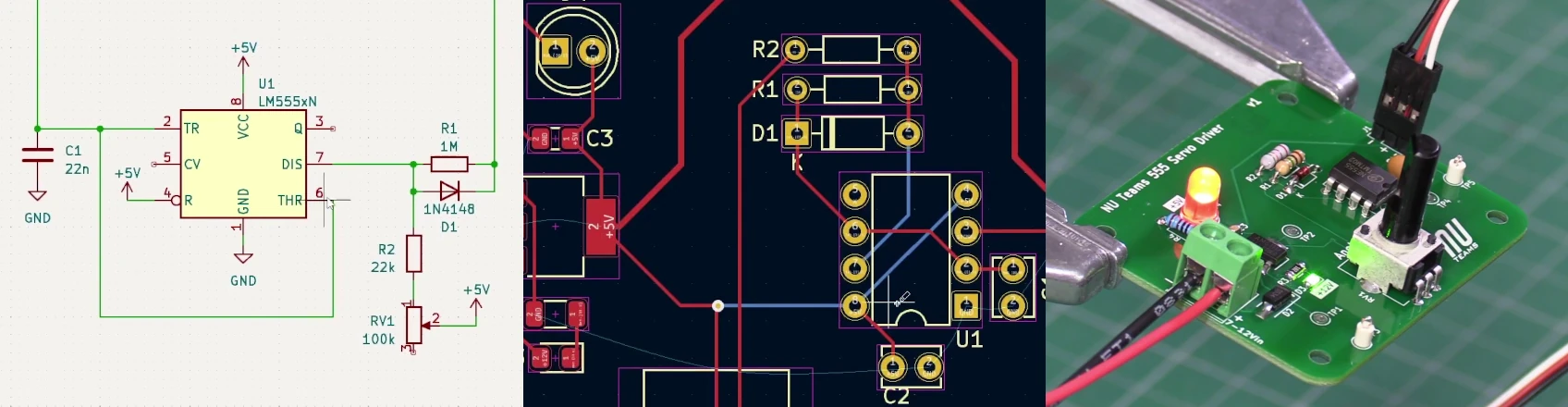

This is a project-driven course. You will design a real, working PCB from scratch, starting with a blank schematic and finishing with a hand-assembled, tested board. The project is a servo angle controller: a pulse-width signal generator that controls the position of a hobby servo motor. It is a self-contained circuit with a power input, a voltage regulator, an adjustable RC oscillator, and a servo output connector. That is enough complexity to cover every stage of the PCB design process without becoming overwhelming.
No prior PCB design experience is assumed. Basic familiarity with electronic components (resistors, capacitors, diodes, voltage regulators) will help you follow the circuit decisions, but the KiCad workflow is taught from the ground up.
The course was developed for Formula Student (FSAE) teams at the University of Newcastle, but the content applies to any engineering student or maker who wants to move beyond breadboards and build something permanent.
Let's Begin
Introduction
Get oriented with KiCad. Install the software and take a guided tour of the interface before diving into your first design.
Core Skills
The essential end-to-end workflow: draw a schematic, assign footprints, lay out the board, export fabrication files, and order your PCB.
Custom Parts
Most real designs use components not in the standard library. Learn how to load and create your own schematic symbols and PCB footprints.
Working in Teams
Share a common parts library across your team, keep it consistent, and run structured design reviews before sending boards to fab.
Prototyping
Design for test and iteration from the start. Add test points and solder jumpers, and learn bodge techniques for fixing boards without a respin.
Advanced Board Layout
Go beyond basic layout: configure net classes, use the autorouter effectively, add custom artwork, and import mechanical board outlines from CAD.
Advanced Manufacturing
Take your boards to production: generate solder paste stencils and prepare files for automated PCB assembly (PCBA) at a fab house.
Credits: Course content and delivery - Michael Ruppe | Editing - Dr. Alexander Gregg